
In this document, we will run through how to set up your project in Takooni. When you register first time, you probably will find an empty deck. Lets start to add website to monitor.
Creating Project in Takooni
Before you begin, make sure you have:
- A registered Takooni account.
- Access to Google Search Console for the website you want to monitor.
- Access to Google Analytics for the same website.
For more information, see How to Check Your Search Console and Analytics Access Level.
From the Takooni Dashboard, follow the steps below to create your project.
1. Create a Project
From the Takooni dashboard, select New Project and enter the website you want to monitor.
Make sure you register the correct website and that the required Search Console and Analytics access is available.
2. Wait for Synchronization to Complete
Once your project has been created, Takooni will begin synchronizing your website data.
For most websites with fewer than 10,000 URLs, the initial synchronization typically takes 10 seconds or less before your website performance data becomes available.
⚠️ Important: Do not repeatedly click the Sync button while synchronization is in progress. Repeated synchronization requests may interfere with the process.
If your website performance data is still unavailable after 24 hours, verify that you registered the correct website and that Takooni has the required access to your Search Console and Analytics data.
3. Start Exploring
Your data is now synced and ready to use. Explore Takooni’s features to see how they can help you analyze your SEO performance, identify opportunities, and optimize your campaigns.
Assigning Extra User
Add team members to your project so they can collaborate and work together in Takooni.
Before adding a user, make sure your subscription includes extra users:
| Plan | Extra User |
|---|
| Lite | Available at USD $2/user |
| Starter | Up to 2 extra users included at no additional cost |
⚠️ Before you start : Make sure the user has already registered on app.takooni.com. An email address that is not associated with a Takooni account cannot be added to the project.
1. How to Add User
To add a new user to your project:
- Open the Project you want to manage.
- From the project dashboard, open Project User in the left-hand navigation.
- Click Add User.
- Enter the user’s registered email address.
- Confirm the email address to add the user to your project.
Newly added users are automatically assigned the Member role.
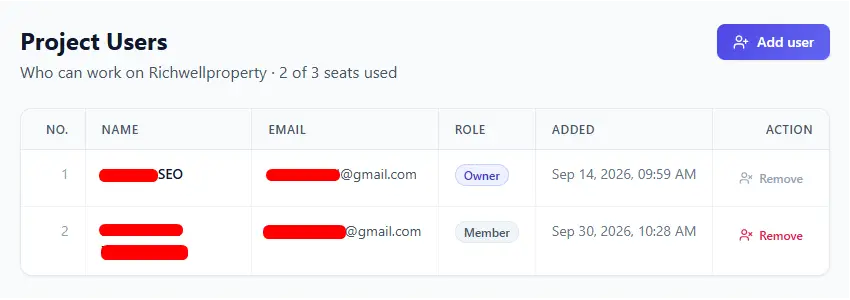
2. Remove User
You can remove users who no longer need access to your project.
- Open the Project you want to manage.
- Go to Project User from the left-hand navigation.
- Find the user you want to remove.
- Click Remove.
- Confirm the removal.
Removing a user revokes their access to the project.
⚠️ Important : Adding a user to a project may affect how Takooni Credits are used. For more information about credit usage for users added to your project, see Takooni Credits.
Last Modified :